Render Order
You can find the example project here.
The rendering order of objects is usually not something to manage manually. Typically the depth buffer takes care of that: objects which are in front will overwrite the pixels of objects in the back. But sometimes it’s important to have a specific order of objects. For example transparent objects need to be rendered back-to-front, as they don’t fully occlude each other. Also, some techniques like shadow mapping, reflections, or depth-prepasses require a given order or special rules which objects should be rendered at which time.
In this chapter we demonstrate different ordering techniques and how to use and combine them.
Ordering example

This example shows different ways to define rendering order of objects in a scene.
Contents of a Ramses Composer project
In order to understand how ordering of content works, it’s essential to understand the contents of a Ramses Composer project first.
A newly created project contains following default objects (which can be deleted later):
A scene graph with one
Node, one (child)MeshNode, and aCamera
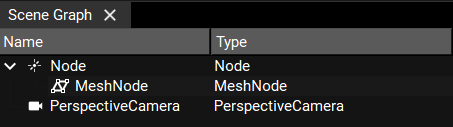
A default render layer and render pass

The root
Nodehas a default tagrender_main
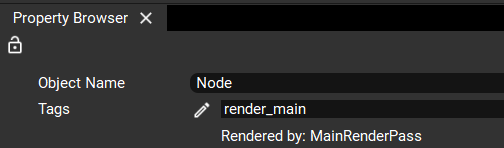
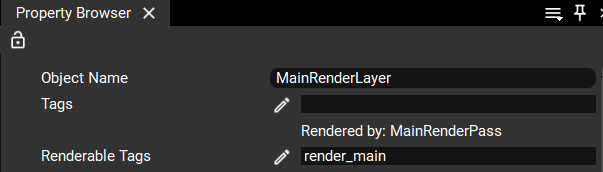
The default
RenderLayerhas a tag entryrender_main, same as the root node
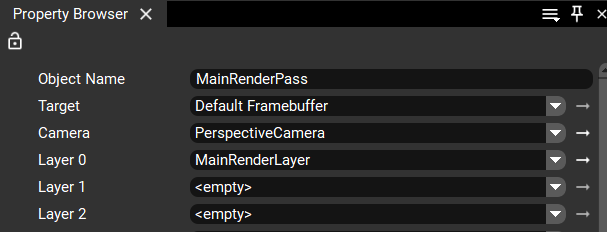
The default
RenderPasshas the defaultRenderLayerin its first slot, and uses the default camera
The way this works is:
The
RenderLayercollects all nodes from the scene with the given tag (render_main) and their child nodes recursivelyThe
RenderPassrenders everything from theRenderLayerusing the selectedCameraThe order of the meshes is influenced by multiple factors, as we will learn in the next sections
Ordering techniques
The order of rendering is influenced by three factors and can be combined in different ways. We demonstrate each of them separately in the next sections, and you can find a separate example project for each of them. Each project has three MeshNodes with different colors rendered in a specific way, but the ordering technique is different for each of them.
Order based on scene graph order
Example project: 1_by_scene_graph.
The simplest approach to order MeshNodes is by their order in the scene graph.
To activate this option, you can select the Scene graph order in the RenderLayer panel:

When this option is selected, all nodes in the render layer will be sorted in the exact same order as they appear in the SceneGraph panel - i.e. parent nodes are rendered before their children, and children are sorted first-to-last.
Order based on tags inside RenderLayer
Example project: 2_by_tags_priority.
If you want a more advanced sorting, you can use multiple tags to cluster different parts of the scene (e.g. “glass”, “opaque_back”, “opaque_front” etc.) and then sort all objects based on their tags.
In this example, we have three quads in different colors, and have a different tag for each color:

Notice that each colored MeshNode has its own tag, and all tags (red, green, blue) are listed in the
RenderLayer renderable tags property field. If you edit the field, you will see that each of the tags
has its own order number assigned to it:
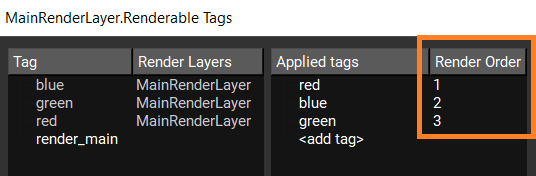
Furthermore, the Render order property further down is set to Render order value in Renderable tags.
This means that this RenderLayer will sort its content based on the numbers assigned to each tag.
The exact rules for the ordering in a render layer are as follows:
If Node A has tag T1 and Node B has tag T2 where T1 < T2, then Node A will be rendered before node B
If T1 == T2, the order will be decided by the Ramses Composer (possibly optimized to minimize OpenGL state changes)
If Node A has two or more tags tags T1 and T2 and T1 != T2 != …, then the Composer will generate an error
Order based on RenderPass slots
Example project: 3_by_render_pass_slots.
Finally, a RenderPass is the place where RenderLayer objects are collected and rendered with a
Camera object. This is where RenderLayer can be ordered between each other too, by the slots they are
assigned to.
In this example, we have a dedicated RenderLayer for each quad - red, blue and green:

The layers are ordered in different slots in the main RenderPass:

If you change the order in these slots, the quads will be rendered in the corresponding order. Go ahead and try it out!
Order with multiple RenderPasses
Example project: 4_by_render_pass.
In the previous sections, we had a single RenderPass which was used to render all content.
It is possible to have more than one RenderPass instances which are rendered relative to each other.
This is also the technique to use if you want to use different cameras!
In this example, we have a dedicated RenderPass for each quad - red, blue and green:
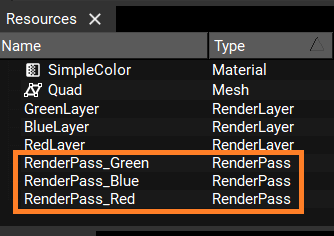
Notice that we still need separate RenderLayers too. RenderPasses don’t group or filter
objects in any way - that’s done by the RenderLayers and their tags. RenderPasses can
only reference RenderLayers which have already collected and possibly sorted their content.
In this setup, each RenderPass has a single RenderLayer attached to it, instead of all three.
The render order of the RenderPasses is defined by their Order property:
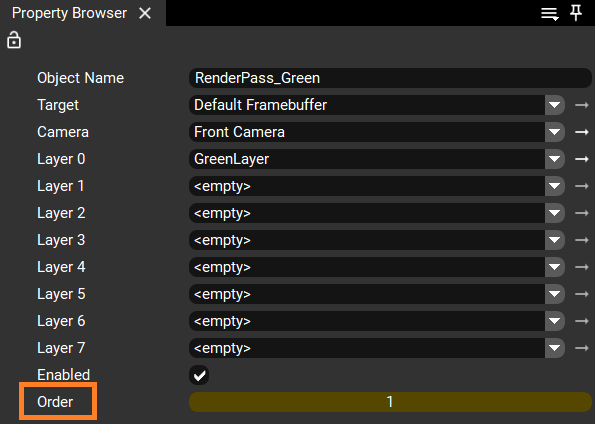
Contrary to RenderLayer tags, RenderPasses must be ordered with unique order. If you have two
RenderPass instances with the same order, you will get an error:
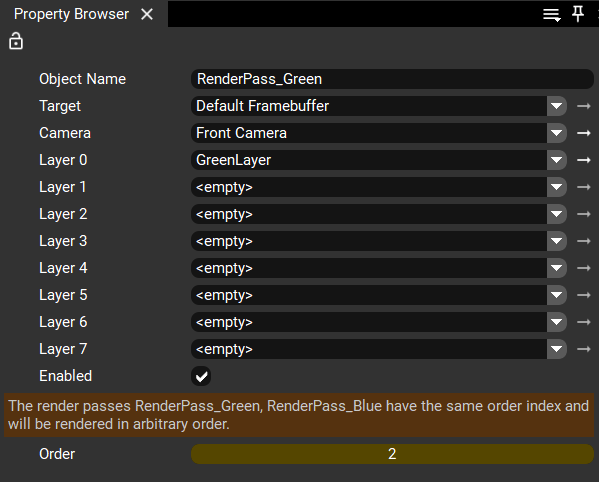
This example has the exact same result as the previous one. However now each RenderPass can
have a different camera! Go ahead and try it - create a second camera, assign it to one
of the passes, change it’s settings and observe the result.
Nested RenderLayers
Example project: 5_nested_render_layers.
For more complex use cases it might prove to be necessary to nest render layers. This can also be
done by just adding the tag used in the renderable tags property field of one RenderLayer object
to the tags property field of another RenderLayer object.
In this case the tagged RenderLayer object follows the same ordering rules as the nodes do
with the following additional rules:
Scene graph order: aRenderLayerusingScene graph ordercannot contain otherRenderLayer. Ramses Composer will ignore the nested render layers and generate an error.Render order value in Renderable tags: the contents of aRenderLayerhaving the same render order value as nodes will be rendered before the nodes.
Dynamic render order
Example project: 6_dynamic_render_order.
All above techniques define static render order. Starting at feature level 4, it is also possible to reorder rendering dynamically.
Render Order property linking is possible for:
RenderLayerRenderable TagsRenderPass
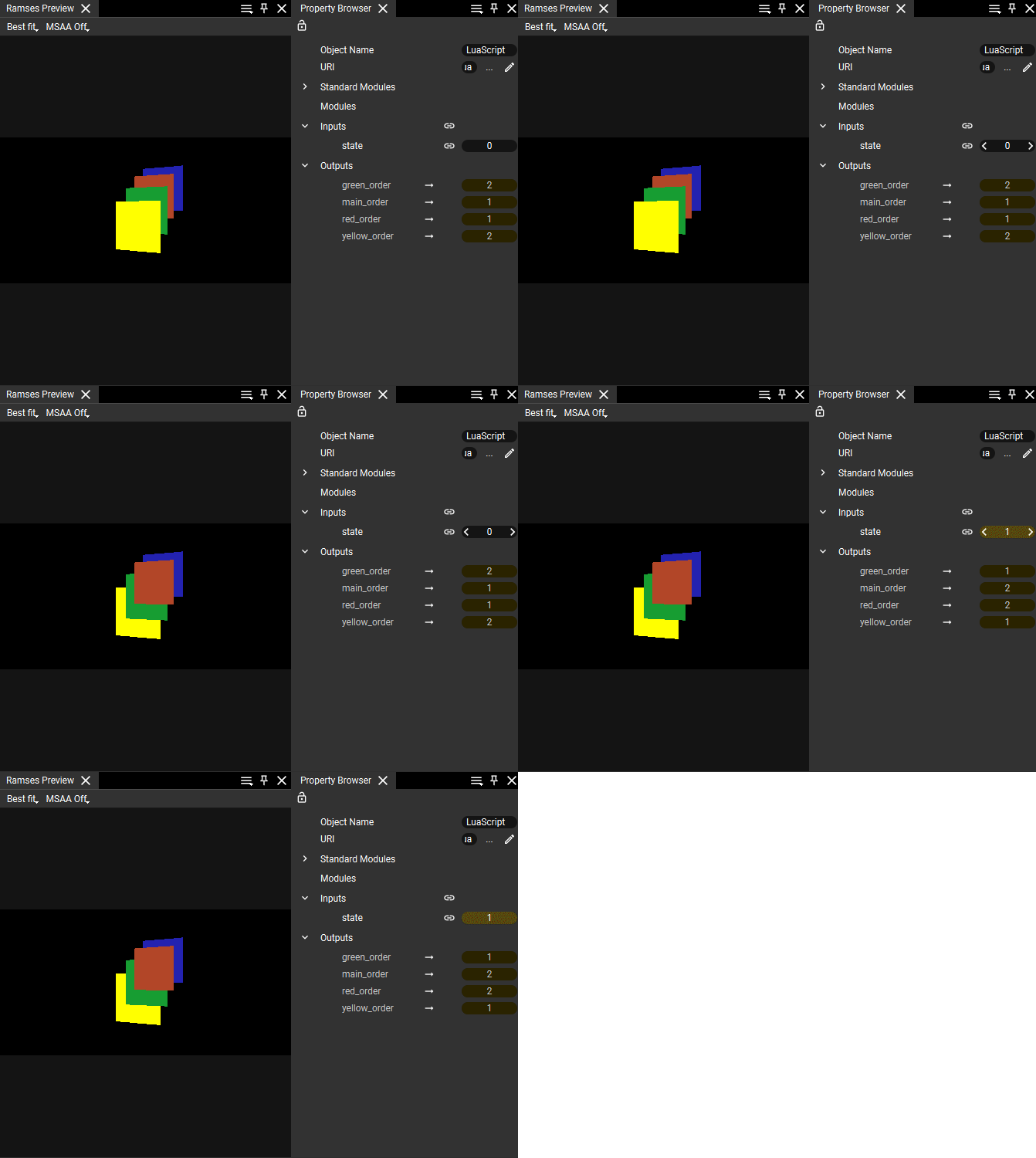
A Lua script can be used to dynamically set the Render Order based on application business logic. Example script outputs are linked to Render Order properties of:
redandgreenRenderable Tags ofMainRenderLayerRender Order of
MainRenderPassandYellowRenderPass

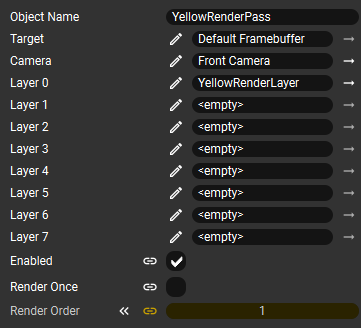
Depending on state script input being 0 or non-zero, script outputs reorder rendering of Red and Green quads within MainRenderLayer. At the same time order of MainRenderPass and YellowRenderPass is flipped by Lua script outputs.
Combining the techniques
The ordering mechanisms described in this example are compatible to each other and can be combined. It is possible to use different mechanisms for different RenderLayer or RenderPass objects. It is also possible to refer to tags used in nested projects (see external references).
To understand which Ramses objects are generated based on the RenderPass, RenderLayer and SceneGraph structures, see the data and scopes section.