BlitPass example
You can find the example project here.

This example shows how to use BlitPass render pass to perform copy between render buffers with the Ramses Composer.
In OpenGL, blitting is an efficient operation to copy rectangular regions between FBOs (represented in Ramses Composer by RenderTargets). It allows to re-use already rendered buffers containing color, depth or other data format in subsequent render passes.
Similarly to the offscreen rendering example, this example first renders the front view of a duck to an offscreen render target. Then it blits color render buffer region to another render buffer four times to create a tiled image. Finally, it uses both render buffers contents to render textured quads, as well as original mesh (seen from default camera), to the default framebuffer.
Scene graph and resources
First, the scene is set up. It contains:
Two meshes: a duck and a quad
MeshNodes:
DuckMeshNode,QuadMeshNodeLeftandQuadMeshNodeRightTwo cameras: a
DuckCamerafor offscreen rendering of the duck front view, and the defaultPerspectiveCamerafor the final scene
All meshes are rendered using TextureMaterial. Note that each MeshNode has a Private Material defined to specify individual texture and toggle UV-flipping. Quad meshes exported from Blender and to flip the V coordinate. The image below cycles through all three Private Materials:

Offscreen rendering
Second, offscreen rendering using DuckRenderPass to DuckRenderBuffer is set up:
DuckRenderBufferusingRGBA8color format andDuckDepthRenderBufferusingDepth24format are created. They are set toDuckRenderTarget. Binding the depth buffer to the render target allows for depth-test.DuckRenderLayeris created with Renderable Tags set toduck, the tag assigned also toDuckMeshNodemesh.DuckRenderPassis created, specifying rendering of theDuckRenderLayernodes usingDuckCameratoDuckRenderTarget.RenderOrder property of
DuckRenderPassis set to 0: it draws toDuckRenderTargetbuffers before MainRenderPass readsDuckRenderBufferas texture for quads. Clear Color property is set to some sort of green.
BlitPass
Next, four BlitPass instances are created. Each one blits the same pixel region with duck’s head from DuckRenderBuffer to BlitRenderBuffer four times in different locations to create a tiled pattern.
BlitRenderBufferis created for blit destination. Its dimensions must match source dimensions.BlitPasswithDuckRenderBufferas Source Render Buffer andBlitRenderBufferas Target Render Buffer is created.Note that source and destination render buffers must have same dimensions and format. They must be different render buffers.
Buffer Offset and Blitting Region dimensions specify the rectangular area to blit.
BlitPassRenderOrder is set to 1: it must be executed afterDuckRenderPass.
After creating and setting up the first BlitPass, Duplicate (Ctrl+D) command can be used to create three more copies. Blit regions are then specified individually.
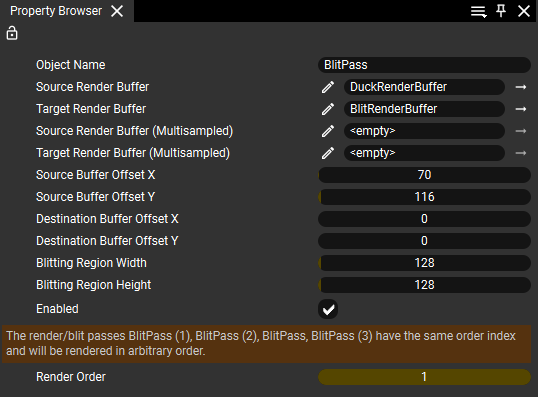
Note that all BlitPasses have same RenderOrder. Ramses Composer informs user that their execution order is undefined (as seen on screenshot). In this example, the execution order among BlitPasses does not matter: there is no mutual dependency between them.
Displaying offscreen buffers contents
Finally, to visualize contents of both blit source, DuckRenderBuffer and destination, BlitRenderBuffer, they are set as texture uniforms u_Tex in the Private Material of left and right QuadMeshNodes. Note that u_FlipUV attribute is set to 1, because the Quad mesh has V coordinate flipped.
MainRenderLayer Renderable Tags are set to render_main (for rendering quads) and duck to display original duck mesh side view rendered with default PerspectiveCamera.
MainRenderPass Render Order is set to 3: it is must be executed last, after DuckRenderPass and all BlitPasses, because it depends on their output render buffers.